
OneNote does not have a flashcard mode. There is no flip button, no deck, and no reminder to come back tomorrow. What it does have is a few tricks for hiding answers, and, since late 2025, Copilot features that can turn your notes into cards for you.
So the real question is not "can I make flashcards in OneNote?" You can, in several ways. The question is which way fits how you study, and whether anything will tell you when to review. That second part is where most OneNote flashcard setups fall apart, and it is the part the other guides skip.
The short answer: if you just want to quiz yourself on one page tonight, the collapse trick in OneNote is free and takes two minutes. If you want cards made for you, Copilot can do it, but it needs a paid Microsoft 365 plan or a school or work account. If you want to still remember the material in a month, move the cards into an app that schedules reviews.
The Six Routes at a Glance
Everything below was checked on 2026-09-21 against Microsoft's own support pages and each app's pricing page.
Read the last column again. Of the six routes, only the one that leaves OneNote schedules your reviews. That is not a small detail. Reviewing at growing intervals is what makes flashcards work, and it is the reason dedicated flashcard apps exist.
1. The Collapse Trick - Free, No Setup
This is the classic method, and it still works in current OneNote.
Type a question on its own line. Press Enter, then Tab, and type the answer, so the answer sits indented under the question. Repeat for every card. When you are done, collapse the questions so only they show.
In OneNote for Windows, click a question line and press Alt+Shift+Minus to collapse it. Press Alt+Shift+Equals to expand it again and check your answer. These are Microsoft's own shortcuts from its OneNote keyboard shortcuts list. You can also click the small arrow that appears to the left of a line with indented text under it.
What it is good for: a quick self-test on one lecture, with zero setup and no cost. The OneNote app itself is free on the App Store (checked 2026-09-21) and on Windows.
Its limit: you are the scheduler. OneNote will never tell you which cards you got wrong last time, or that it is time to look at page 12 again. For a handful of cards that is fine. For a semester of notes it is not.
2. The Question Tag and a Table - Free, Better for Sorting
If you want your cards in one place instead of scattered across pages, use a table.
Type a question, press Tab, and OneNote turns the line into a two-column table. Put questions on the left and answers on the right. To test yourself, cover the right column with a sticky note on screen, or change the answer text to white and select it when you want to check.
Add the Question tag (Ctrl+3 on Windows) to any line you want to come back to. Later, the Find Tags pane gathers every tagged question from your notebook into one list.
The real value of the table is not the studying. It is that a clean two-column table is the easiest thing to move into a flashcard app later. More on that in route 6.
Its limit: the same as route 1. No flip, no scores, no reminders.
3. Copilot Chat in OneNote - Fast, Paid
Microsoft 365 Copilot can write flashcards from the page you are on. Open the page, open the Copilot pane from the ribbon, and ask something like "Create 15 question-and-answer flashcards from this page." Microsoft published a short how-to for this, "How to use Copilot to make flashcards from your notes", on 2025-11-05.
Copilot in OneNote is available in OneNote for Microsoft 365 on Windows, Mac and iPad, with the web version still rolling out. For home users it comes with a Microsoft 365 plan. On Microsoft's plan comparison page those cost:
What it is good for: turning a long page into a first draft of cards in seconds.
Its limits: the result is text on a page. You still have to hide the answers yourself, using route 1 or 2. And like any AI summary, it can miss the point of your notes or invent a detail, so read every card before you study it.
4. Copilot Notebook Study Guide - Real Flip Cards
This is the most complete Microsoft option, and the one most OneNote users have not found yet.
Copilot Notebooks live inside OneNote. You add references, such as OneNote pages, Word files or PDFs, and Copilot works from them. In a notebook, press the plus sign in the References pane and choose Study Guide. Copilot builds a set of study pages from your sources: flashcards, a quiz built on Microsoft Forms, fill-in-the-blank exercises and matching tiles.
The flashcards are proper cards. According to Microsoft's Study Guide help page, you click to flip them, you can ask for a hint before you reveal the answer, and you can edit any card or add ones that are missing.
Who gets it: Microsoft says Copilot Notebooks is available to Copilot and Copilot Chat licensed users and to Microsoft 365 Personal, Family, Premium and Pro subscribers. Study Guide features reached school accounts first, so check that the option appears in your notebook before you plan around it.
Two limits Microsoft states and most guides do not repeat:
The flashcard sources must be Word, PowerPoint or PDF files under 100,000 characters, and protected files are not supported.
There is no review schedule. Microsoft's own advice on that page is to practise the cards "daily or every few days". In other words, remembering when to study is still your job.
5. Learning Activities Flashcards - For School and Work Accounts
Microsoft also has a separate web app called Learning Activities, built for classrooms and training. Its flashcard tool takes pasted text or an uploaded Word, PDF, PowerPoint or text file and writes the cards for you.
Microsoft's flashcard help page gives the details: choose term and definition, question and answer, or multiple choice, or mix them. Content must be between 240 and 50,000 characters. While you practise, you mark each card "I know this" or "Still learning", then retry the ones you missed, and you can ask for five more cards.
Who can use it: Learning Activities is aimed at educators, students aged 13 and up, and enterprise users. Creating activities needs Copilot Chat access through a school or work account. Students can practise sets a teacher shares with them even without it.
Its limit: "Still learning" only sends a card back into the current round. Nothing brings it back in three days. To use it with OneNote notes, you export the page to PDF first (see below).
6. Export to a Spaced Repetition App - The Only Route That Schedules Reviews
Every route above leaves the same gap. Spaced repetition apps fill it. They show you each card again just before you are likely to forget it, and space the reviews further apart each time you get it right. For a closer look at why this works, see our guide to active recall and the apps built around it.
OneNote cannot send cards to these apps by itself, so you need one of two bridges: a table you copy out, or a PDF.
To get a PDF out of OneNote on Windows or Mac, choose File, then Export, pick the page, section or notebook, choose PDF and save. OneNote for the web can export a single page to PDF, but not a whole section or notebook.
Three apps worth trying. Anki comes first because it is free and the most widely used. Mindomax is ours, so it comes last.
Anki - Free on Computer and Android
Anki is the standard free spaced repetition app. Copy your two-column table from route 2 into a spreadsheet, save it as a CSV or tab-separated text file, and import it. Anki's import guide accepts fields separated by commas, semicolons or tabs, in UTF-8. Your questions become the front and your answers the back.
Price: free on Windows, Mac, Linux and Android. AnkiMobile for iPhone and iPad is $24.99 once (checked 2026-09-21). We explain where the money goes in Is Anki free?
Its limit: the setup takes an evening, and Anki looks its age. Nothing about it is automatic.
NeuraCache - Reads OneNote Directly
NeuraCache is the one app we found that connects to OneNote itself. Its OneNote page describes a sync: mark a line in your notes with a question tag, and NeuraCache turns it into a card and checks for changes every few hours. You can also sync full pages.
Price: free tier with spaced repetition. Pro is $3.99 a month or $35.99 a year (checked 2026-09-21) on its pricing page.
Its limits: iPhone and Android only, no desktop app for Windows. NeuraCache says the sign-in does not work with the Microsoft Authenticator app installed. Its pricing page also does not list OneNote among the free integrations, so check which tier you need before you plan around it.
Mindomax - Cards From the Exported PDF
Mindomax is our own app, so weigh this entry accordingly. Export your OneNote section to PDF, upload it, and Mindomax writes the flashcards from it, then schedules the reviews. It can also make cards from images and audio files.
Price: the free plan has one box with unlimited cards and review scheduling. Premium, which includes the PDF-to-cards feature, is $0 until 2028 according to mindomax.com/price (checked 2026-09-21).
Its limits: there is no direct OneNote connection, so the PDF step is always needed. The app has no App Store ratings yet, the community is small, and its review scheduler is its own design and has not been independently tested.
If none of these three fit, our list of the best spaced repetition apps covers the rest. And if you are wondering about Quizlet, read whether Quizlet really uses spaced repetition first.
What It Costs, Side by Side
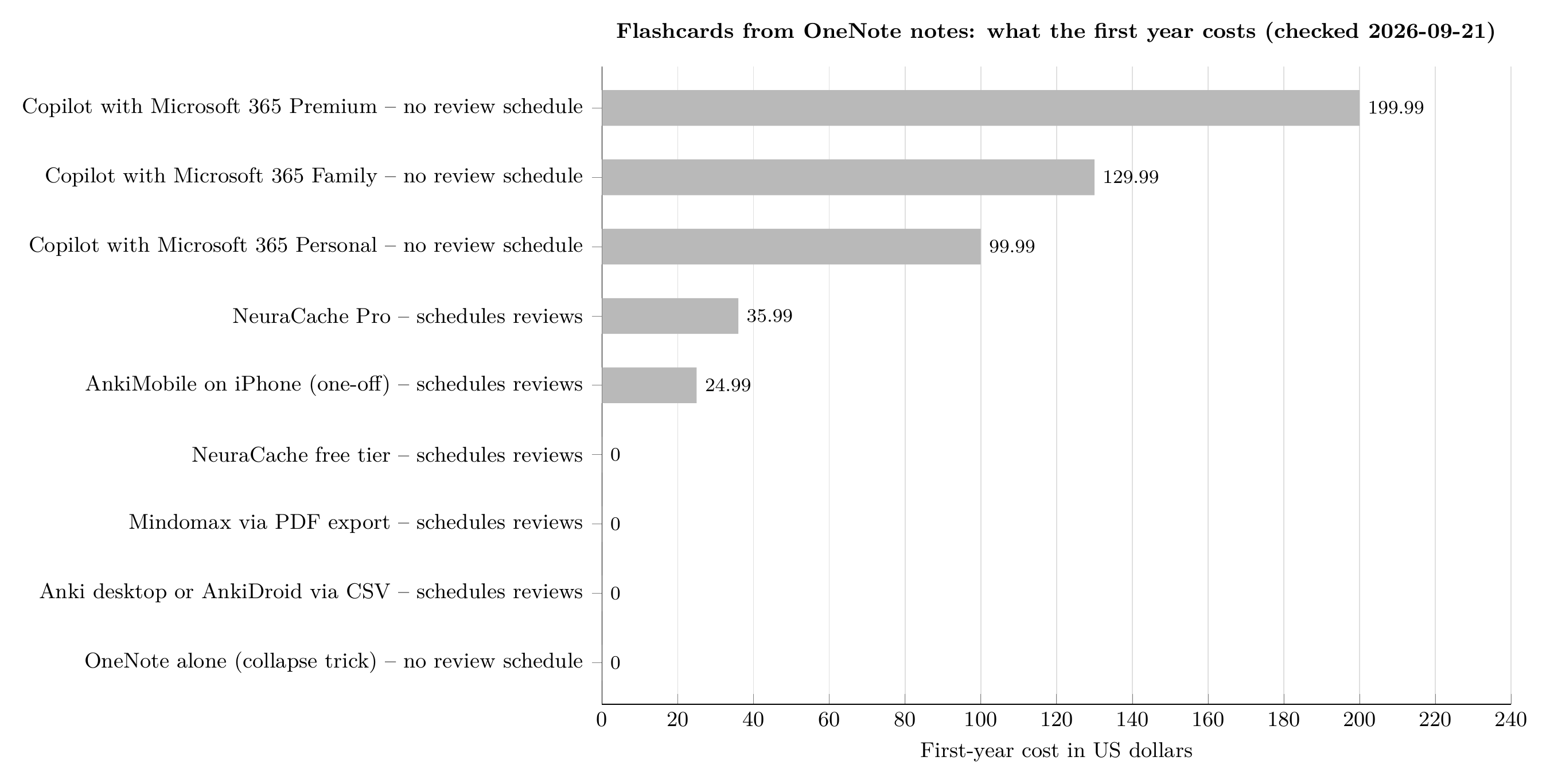
Every Microsoft route that makes the cards for you costs money, and none of them tells you when to review. Prices checked 2026-09-21.
Prices from microsoft.com (Microsoft 365 comparison page), the App Store, neuracache.com/pricing and mindomax.com/price, checked 2026-09-21. Chart by Mindomax.
Which Route Should You Use?
It depends on how long you need to remember the material.
Studying for a quiz this week: use the collapse trick. It is free and you already have OneNote open.
You have a Microsoft 365 plan and a lot of notes: let the Copilot Notebook Study Guide write the first draft of your cards, then fix the ones it got wrong.
Your school gives you Copilot Chat: try Learning Activities, especially if your teacher already shares sets there.
You need the material for a final exam, a licence exam or a language: keep writing your notes in OneNote, but do the reviewing somewhere that schedules it. Anki if you like to control every setting. NeuraCache if you want OneNote to sync by itself and you study on your phone. Mindomax if you would rather upload a PDF and get the cards made for you.
Many students end up using two tools: OneNote to take notes, a flashcard app to remember them. That is not a failure of OneNote. It is a note-taking app, and it is very good at that. If you are still choosing one, we compared the options in the best note-taking apps for students.
If writing the cards is the part that stops you, Mindomax can turn an exported OneNote PDF into a reviewed deck for free.
Frequently Asked Questions
Does OneNote have a flashcard feature?
Not in the notes themselves. OneNote has no flashcard mode, flip button or review schedule. You can hide answers with collapsed lines, and Copilot Notebooks in OneNote can build flip cards in a Study Guide if you have an eligible Microsoft 365 plan or a school or work licence.
Can Copilot make flashcards from my OneNote notes?
Yes. In OneNote for Microsoft 365 you can ask Copilot to write flashcards from the current page, which gives you text cards on the page. In a Copilot Notebook, the Study Guide option creates interactive flip cards with hints from your sources.
Is there spaced repetition in OneNote?
No. None of the Microsoft options schedules reviews. Microsoft's own Study Guide help suggests practising the cards daily or every few days. For automatic review scheduling you need a spaced repetition app such as Anki, NeuraCache or Mindomax.
How do I move OneNote flashcards into Anki?
Put your questions and answers in a two-column table in OneNote, copy it into a spreadsheet, save it as a CSV or tab-separated text file in UTF-8, and use Anki's File, Import. Map the first column to the front and the second to the back.
Can I use OneNote flashcards on my phone?
OneNote has no flip mode on any platform. NeuraCache syncs OneNote notes into a flashcard app on iPhone and Android, and Mindomax works on iPhone and Android from an exported PDF.