The Short Answer
Pick Anki if you want the strongest free flashcard engine and the biggest library of shared decks. It costs nothing on Windows, Mac, Linux, Android and the web, and the iPhone app is a one-time $24.99 (checked 2026-09-12). Pick RemNote if you take notes and study in the same place and want your cards to grow out of those notes. It is free to start, but the free plan stops at 3 annotated PDFs, 5 image occlusion cards and 1 exam in the exam scheduler, and Pro costs $96 a year (checked 2026-09-12).
For most people that is the whole decision: a card engine you feed, or a notebook that makes cards. The rest of this page is the evidence. Both price sheets, RemNote's free-plan caps in numbers, the truth about FSRS on each side, what survives a move from Anki to RemNote, and which app is still being updated.
Every figure below was read from the vendor's own page, its help centre or its app store listing on 12 September 2026. Where a vendor does not publish a number, we say so rather than guess.
RemNote vs Anki at a Glance
What Each One Costs
Anki's price fits in two sentences. The desktop program, AnkiWeb and AnkiDroid are free, and AnkiMobile for iPhone and iPad is a one-time $24.99 in the US App Store (checked 2026-09-12). There is no subscription anywhere and no free trial of the iPhone app, which is why so many new users ask whether it is worth the money. The iPhone price also changes from country to country; our guide to whether Anki is free lists 39 App Store storefronts.
RemNote sells three paid shapes, and no other comparison of these two apps prints all of them. On the yearly view of its pricing page, Pro is $8 a month billed as $96 a year, and Pro with AI is $18 a month billed as $216 a year (both checked 2026-09-12). The third, Life-Long Learner, is $395 once (checked 2026-09-12). It keeps the Pro desktop features forever, but file uploads, Pro server features and 1,000 AI credits a month are included for five years, not for life.
Both plans can also be paid month by month. RemNote showed us that option only in euros, at 10 and 20 euros a month (checked 2026-09-12), so the tables below use the yearly US prices.
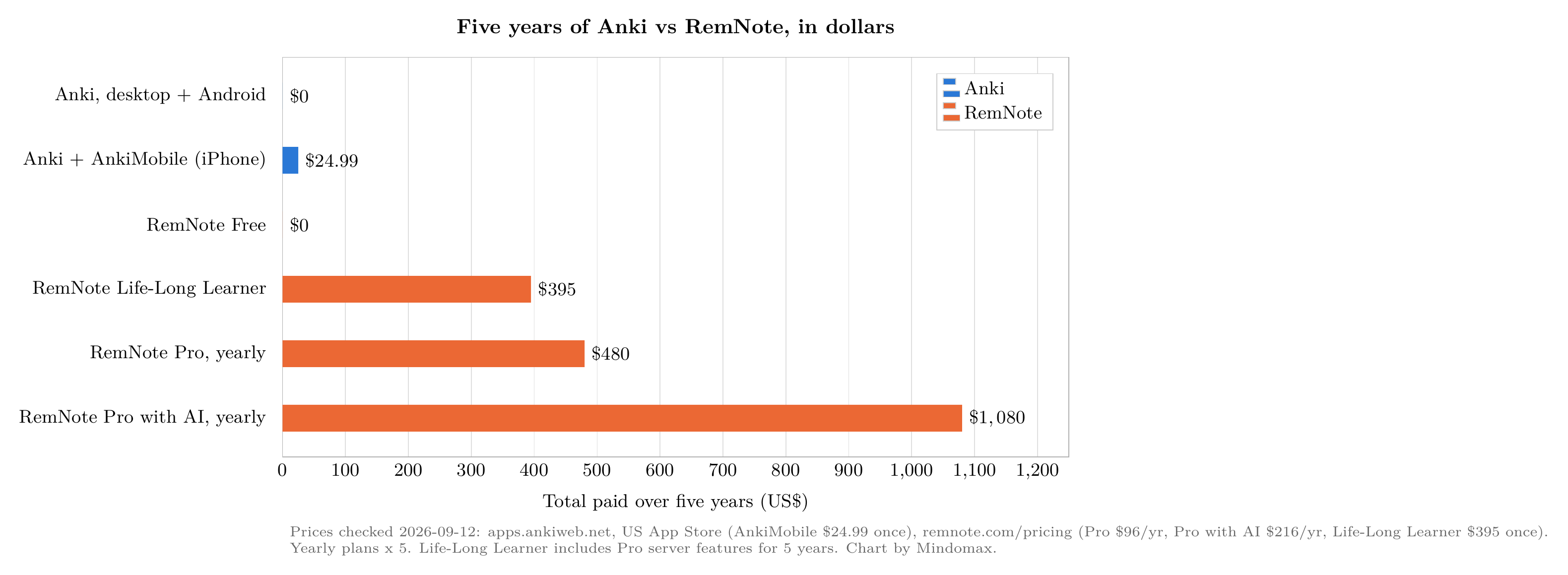
Five years of Anki vs RemNote in dollars. Prices from apps.ankiweb.net, the US App Store and remnote.com/pricing, checked 2026-09-12. Chart by Mindomax.
Three things stand out. The Life-Long Learner licence pays for itself against yearly Pro in a little over four years ($395 against $96 a year, checked 2026-09-12), but its server features stop after five, so "lifetime" means the desktop app, not the whole service. The AI plan more than doubles the bill, and it matters, because RemNote's most advertised features, AI cards from PDFs and the lecture recorder, sit in that tier. And Anki's most expensive route, the iPhone app, costs about what three months of RemNote Pro cost on the yearly plan ($24.99 against $8 a month, checked 2026-09-12).
What RemNote's Free Plan Leaves Out
RemNote Free is generous where it counts for flashcards: unlimited notes, unlimited flashcards and unlimited synced devices. The caps sit on everything around the cards, and they decide whether you ever pay.
Source: remnote.com/pricing, read 2026-09-12.
Which cap you hit first depends on how you study. A medical student who labels anatomy diagrams will use up 5 image occlusion cards in one afternoon, while Anki has had image occlusion built in, with no limit, since version 23.10. A student who learns from lecture PDFs will reach the 3-document cap in the first week. Someone who only types question-and-answer cards into their notes may never hit anything at all.
Anki's free version has no caps of this kind. Its gaps are different: no built-in PDF reader, no note-taking, and no AI card maker unless you install an add-on.
The Algorithms: Both Have FSRS, Neither Turns It On for You
If you read one outdated sentence about these two apps, it is usually "Anki uses SM-2." That stopped being the whole story with Anki 23.10 in late 2023. Since then Anki has shipped the Free Spaced Repetition Scheduler, FSRS, which the Anki manual calls an alternative to Anki's legacy SM-2 algorithm that can help you remember more in the same study time. It works in Anki 23.10 and later, AnkiMobile 23.10 and later, AnkiWeb, and AnkiDroid 2.17 and later, and it costs nothing. But you have to turn it on yourself in the deck options, then choose a desired retention.
RemNote added FSRS in 2024, and its help centre now says it runs FSRS version 6. The same page is plain about its status: FSRS is a beta feature that you have to enable yourself, and it may become the default later (RemNote Help Center, read 2026-09-12). RemNote also repeats the usual FSRS promise of 20 to 30 percent fewer reviews for the same retention.
So the honest answer to "do they use the same algorithm?" is: the same family, switched on by default in neither, and still labelled beta in one of them. If the scheduler is your reason to choose, Anki has had FSRS longer, exposes more of its settings, and is the app the open FSRS benchmark was built on. Our FSRS vs SM-2 explainer covers what the switch actually changes.
RemNote does have one scheduling feature Anki lacks: the exam scheduler. You give it an exam date and a study plan, and it bends your reviews towards that date, where Anki and SuperMemo aim at long-term retention (RemNote's own comparison page). On the free plan you get one exam at a time.
Making Cards: Notes First or Cards First
Anki starts with cards. You read a chapter or watch a lecture, then open Anki and write question-and-answer pairs, clozes or image occlusions, usually into a note type you can shape with HTML and CSS. The payoff is control and a huge public library. For many exams someone has already made the deck, and AnkiWeb's shared decks and add-ons are free.
RemNote starts with notes. You write in an outliner, and a line becomes a flashcard when you put a short marker such as >> or :: between the prompt and the answer. Each card stays attached to the note it came from, so a review shows its context, and two-way links tie ideas together across documents. PDFs open inside the app and your highlights become study material. For a student who already takes careful notes, that removes the second job of copying them into a flashcard app.
The trade-off runs the other way too. RemNote's library of shared decks is small next to Anki's, and heavy card styling does not survive a move between them.
Moving From Anki to RemNote
This is the question every heavy Anki user asks before trying RemNote, and the pages ranking for this search rarely answer it. RemNote imports Anki .apkg files. Its help centre says basic cards, clozes, image occlusions (both Anki's own and Image Occlusion Enhanced) and most custom note types come across, along with scheduling information, deck presets and media, as long as you tick those options when you export from Anki (Importing from Anki, read 2026-09-12).
Three things do not make the trip. Custom CSS on your note types is dropped, so cards will look different. Custom JavaScript on card templates is not supported, so cards that depend on it may break. And text-to-speech that Anki generates on the fly stops working; only cards with real audio files keep speaking.
One more behaviour catches people out. RemNote sends newly imported cards to a separate "Need to Learn" queue, so your Anki review history does not simply become tomorrow's queue. Plan a few sessions to work through it.
Going the other way, from RemNote back to Anki, is not covered in the help pages we read, so we make no claim either way.
Who Is Still Updating What
Store figures read on 2026-09-12 from the US App Store and Google Play; the Anki desktop release is from the project's GitHub page.
The pattern is easy to read. Anki's desktop program is actively maintained, but the paid iPhone app had gone 369 days without an update on the day we checked. RemNote updated both of its phone apps two days before we looked. Anki's reach is in another league, though: AnkiDroid alone has more than ten million installs, a hundred times RemNote's Android figure.
Who Should Pick Which
Choose Anki if you are preparing for an exam that already has a big shared deck, such as medical boards; if you want FSRS with every setting exposed; if you study on Android or a computer and want to pay nothing; or if you care that the software is open source. Medical students are the classic Anki users. At one US medical school, about 70 percent of first-year students in an anatomy and physiology course used it (Harris and Chiang, Cureus, 2022).
Choose RemNote if your notes are the thing you study from; if you learn from PDFs and want highlights to turn into cards; if you have a fixed exam date and want the schedule built around it; or if you would rather pay $96 a year (checked 2026-09-12) than stitch together a notes app, a PDF reader and Anki.
Plenty of students use both: notes and PDFs in RemNote, a shared deck in Anki. That works, but your cards then live in two places on two schedules.
If Neither Fits
Three other tools sit between a notes app and a card engine.
Obsidian with the Spaced Repetition plugin. Obsidian is a markdown notes app that is free for personal use, with optional Sync at $4 a month billed yearly (checked 2026-09-12). The community Spaced Repetition plugin turns lines in your notes into flashcards and schedules them with FSRS or SM-2. It is MIT-licensed, and its latest release, 1.15.4, came out in June 2026. The limitation: it is a volunteer plugin, not part of Obsidian, so its future depends on its maintainers.
Mochi. Mochi is a minimal markdown flashcard app that is free forever with unlimited cards and decks. Pro, at $5 a month billed annually (checked 2026-09-12), adds sync across devices. The limitation: there is no large shared-deck library, so you make almost everything yourself.
Mindomax, our own app. Mindomax makes flashcards with AI from PDFs, audio and images and schedules them with spaced repetition. The free plan keeps one box with unlimited cards, and the price page lists Premium as free until 2028 (checked 2026-09-12). The limitations are real: it is young, with 1K+ installs on Google Play and no US App Store ratings yet; it cannot import Anki .apkg files, so decks arrive without their history; and its scheduler has no public benchmark.
For more options, our guide to 31 flashcard apps dates every price, and the same head-to-head treatment exists for Brainscape vs Anki and Quizlet vs Anki.
If you want to see how AI-made cards feel next to your RemNote notes or Anki decks, Mindomax is free to try.
Frequently Asked Questions
Is RemNote better than Anki?
Neither is better for everyone. RemNote is better if you study from your own notes and PDFs and want cards made inside them. Anki is better if you want the largest shared-deck library, full control over FSRS, and an app that is free everywhere except iPhone.
Is RemNote free?
Yes, with caps. RemNote Free includes unlimited notes, flashcards and synced devices, but only 3 annotated PDFs, 5 image occlusion cards, 1 exam in the exam scheduler and 250 AI credits a month. Pro removes the caps for $96 a year (checked 2026-09-12).
Can RemNote import Anki decks?
Yes. Export your deck from Anki as an .apkg file with scheduling and media ticked, then import it in RemNote. Basic, cloze, image occlusion and most custom note types come over, but custom CSS, template JavaScript and on-the-fly text-to-speech do not, and new imports land in a separate Need to Learn queue.
Does RemNote use FSRS like Anki?
Both support FSRS, and neither turns it on by default. Anki has had it since version 23.10. RemNote runs FSRS version 6 as an opt-in beta, according to its help centre on 2026-09-12.
Is Anki worth the 25 dollars?
Only if you study on an iPhone or iPad. The $24.99 US price (checked 2026-09-12) is a one-time payment for AnkiMobile; Anki is free on computers, on Android and on the web, and your cards sync between all of them for free through AnkiWeb.
Is RemNote good for medical school?
It can be, especially for students who build their own notes from lectures and PDFs. But most medical students lean on shared Anki decks mapped to board exams, and RemNote's free plan allows only 5 image occlusion cards, so plan on Pro if you label a lot of diagrams.